Guides / convert pdf to cad free
How to convert PDF to CAD for free
You can convert PDF to CAD for free in four ways: a free in-browser converter, Inkscape, a free CAD trial with PDF import, or redrawing over the PDF as an image. They differ in what survives the trip: scale, text, layers and curves. We tested them on the same drawings described in how we test, so the numbers below are measured, not guessed.
Which free methods are there?
| Method | Cost | Keeps scale | Keeps text | Keeps layers | Scans | Privacy |
|---|---|---|---|---|---|---|
| Browser converter (DXF) | Free | Yes, with a scale tool | Yes | One per colour | Traced outlines | File stays on your computer |
| Inkscape: open PDF, save as DXF | Free, open source | Paper size; scale by hand | No, convert text to paths first | Inkscape layers | No | Local |
| AutoCAD trial: PDFIMPORT | Free during the trial | Asks for a scale | Yes, TrueType text | PDF layers | No | Local |
| Redraw over the PDF as an image | Free in any CAD program | Calibrate the image | You retype it | You make them | Yes | Local |
Two points decide the choice. First, is the PDF a vector PDF (exported from a CAD or drawing program) or a scan? Our guide on vector or scanned PDFs shows the 10-second check. Second, do you need the drawing to scale? For anything you build, cut or quote from, you do.
Method 1: a free browser converter
A browser converter reads the lines, curves and text stored in the PDF and writes a DXF file, the open CAD format every program reads. The free PDF to DXF converter on our sister site works this way, entirely inside the browser tab.
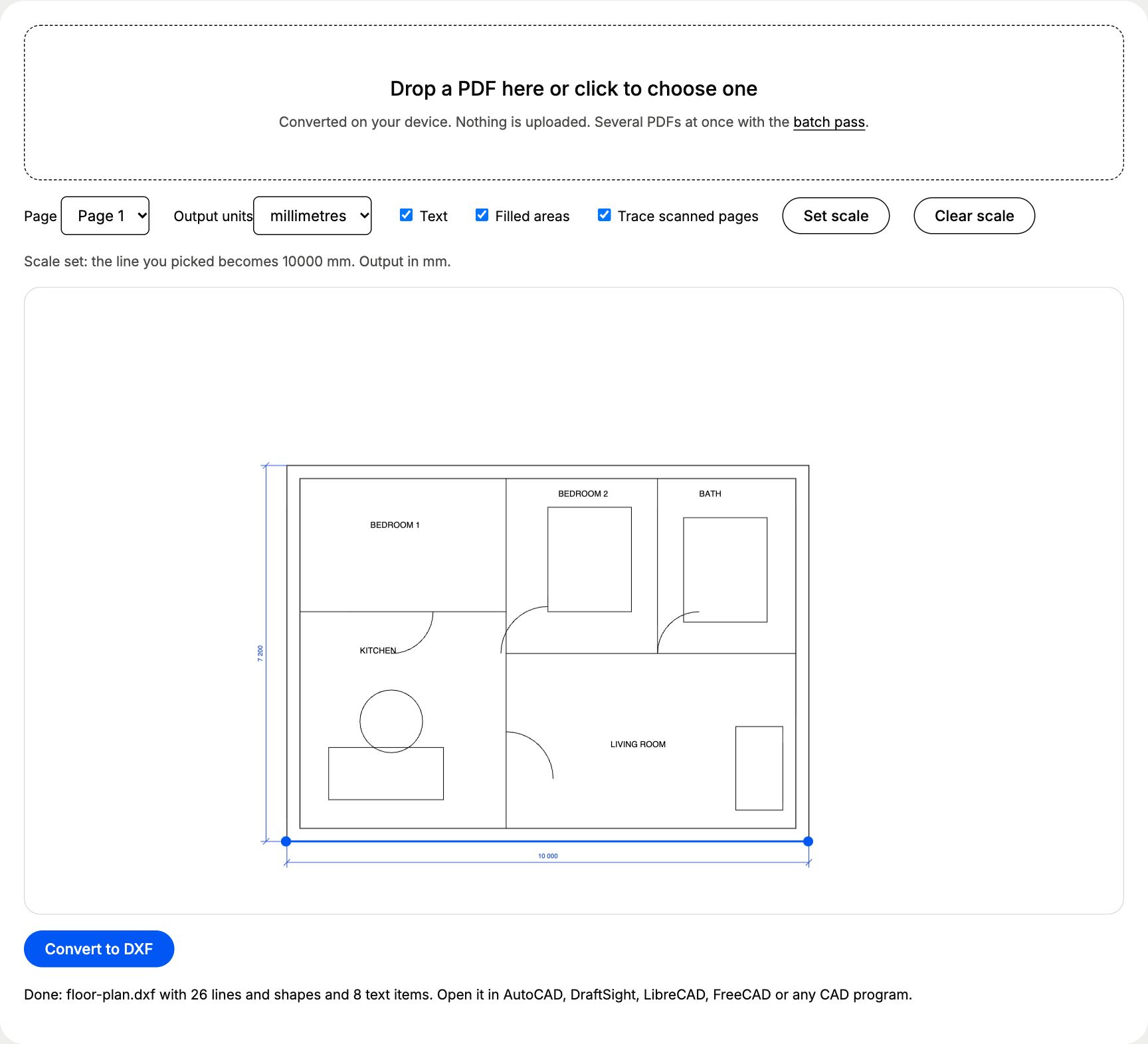
- 1Drop the PDFthe page previews it; choose the page if there are several
- 2Set the scaleclick both ends of a known dimension and type its real length
- 3Download the DXFopen it in your CAD program, save as DWG if you need one
Best for: plans, details and parts from CAD exports. Watch out for: a PDF with several scales on one sheet needs one conversion per scale.
Method 2: Inkscape
Inkscape, the free vector editor, opens a PDF page and saves it as Desktop Cutting Plotter (AutoCAD DXF R14). It handles curves and shapes well, which makes it popular for logos and laser files. Text is the weak spot: the DXF R14 export drops text, so you run Path > Object to Path first and the letters become outlines you can no longer edit. The drawing arrives at paper size, so you scale it in CAD afterwards.
Best for: logos, signs and laser artwork. Watch out for: dimension text turns into shapes.
Method 3: a CAD trial with PDF import
AutoCAD and AutoCAD LT 2017 and later have PDFIMPORT, which turns PDF vectors and TrueType text into AutoCAD objects and asks for a scale. BricsCAD has a PDFIMPORT command too. Both are paid programs with free trials, so a one-off conversion during a trial costs nothing. The step-by-step version is in PDF to AutoCAD.
Best for: offices that will keep using the program. Watch out for: the trial ends, and the drawing should stay readable afterwards, so save a DXF copy.
Method 4: redraw over the PDF
Every CAD program can place an image or PDF underlay, scale it to a known dimension and let you draw over it. It is the slowest method, and the only one that gives a perfectly clean result from a poor scan, because you decide what each line is.
How accurate is each method?
Error on a 10 m wall, same test floor plan
| Converter, scale typed in | 0.0 mm |
|---|---|
| Converter, two-click scale | 3.6 mm |
| Converter, traced scan | 38.0 mm |
The pattern holds across tools: vector PDFs convert exactly, scans don’t. A traced scan follows the outside of every ink line, so every size grows by the line thickness, and any skew from the scanner adds more.
Which free method should you pick?
You have a scan or a photo
- Trace it in a converter for a quick background
- Or place it as an image and redraw
- Ask the sender for the original PDF or DWG first
You have a vector PDF
- Use a browser converter with a scale tool
- Inkscape for logos and laser shapes
- Save the DXF as DWG if your office needs it
What do free tools never give you?
- Objects with meaning. Walls, doors and dimensions come across as lines and text, never as BIM walls or associative dimensions.
- The original layers by name, unless the PDF itself was exported with layers.
- Blocks. Repeated symbols (doors, furniture) arrive as separate lines.
When a drawing is going to be edited for months, it can be quicker to redraw the PDF in CAD on top of a converted background than to clean up every line.
Questions people ask
What is the best free way to convert PDF to CAD?
For a vector PDF, a free converter that reads the PDF's lines and writes DXF, with a scale tool. In our test that kept the outlines exact and the text editable. Inkscape is a good second choice for shapes and logos.
Is AutoCAD's PDF import free?
PDFIMPORT is part of AutoCAD and AutoCAD LT (2017 and later), which are paid. Autodesk's free trial includes it, so a one-off conversion during a trial costs nothing.
Can a free tool convert a scanned PDF to CAD?
It can trace the ink into outlines. In our test a traced scan came out 0.4% too large, so use it as a background to redraw over rather than as the final drawing.
Are free online converters safe for client drawings?
Upload converters keep your file on their server for a while, which many NDAs forbid. Converters that run in your browser never receive the file.